
Work Schedule: Types, Examples, and How to Make One

Work Schedule: Types, Examples, and How to Make One
A work schedule defines how working hours, shifts, and responsibilities are structured across a team. In operations-heavy environments, a work schedule is not just a calendar view of who is on duty – it directly shapes execution quality, workload balance, and response time. When managers ask why delays, overtime, or coverage gaps keep happening, the answer often sits inside the work schedule itself. Different types of work schedules exist because operational realities differ. A fixed administrative team, a 24/7 support desk, and a field service crew cannot rely on the same job schedule logic. The structure must match demand patterns, coverage windows, and skill distribution. A work schedule is therefore a control mechanism. It allocates people, hours, and tasks in a way that keeps operations predictable. Most breakdowns are not caused by a lack of staff but by unclear assignment rules, double bookings, or unmanaged changes. For field teams and distributed operations, scheduling becomes part of operational governance: who goes where, when, and under which constraints.

What Is a Work Schedule
A work schedule defines who works, when they work, and what they are responsible for during that time. In practice, a work schedule sets the operating rhythm: it tells the team where coverage exists and when handoffs happen. A job schedule is narrower – it ties specific jobs, visits, or tasks to time windows and owners, which is critical for field and service teams.
A typical work schedule includes:
- Days and working hours;
- Shifts and handoff points;
- Roles and skill coverage;
- Locations or service zones (for field operations);
- Rules for substitutions and time-off conflicts. For operational teams, scheduling is directly connected to SLA commitments, response time, and coverage planning. If the schedule is not centralized, teams quickly run into double assignments, coverage gaps, and overtime that grows “by accident” rather than by plan. That’s why field service scheduling often becomes part of dispatching: tasks and people must stay linked as conditions change.
In platforms like Planado, this linkage is maintained in one interface where assignments, availability, and workload visibility support day-to-day dispatch decisions without relying on parallel spreadsheets or chats.
Types of Work Schedules
Different work schedules solve different operational problems. The right structure depends on demand stability, coverage requirements, and how much flexibility your team can reliably coordinate without creating confusion. In operations, schedules are chosen to prevent specific failure modes: missed coverage, overtime spikes, slow response, or unclear responsibility. A good schedule type also matches how work “arrives” – steady workload, peak windows, 24/7 demand, or job-driven field visits – so planning doesn’t rely on constant manual fixes.
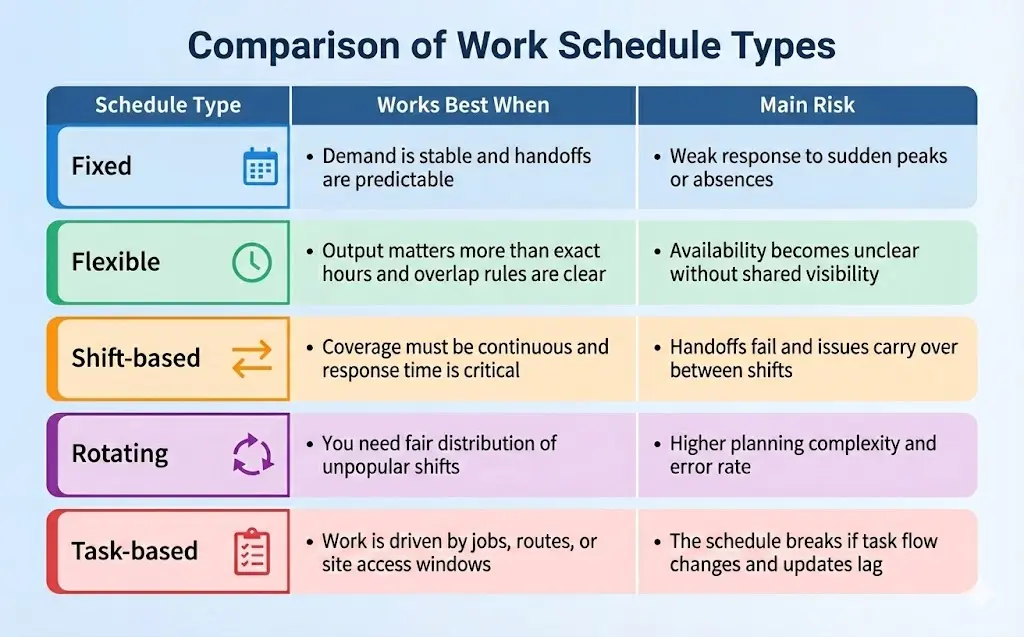
Next, each schedule type has a clear “best use” and a predictable trade-off – the key is choosing the model that reduces your biggest operational risk.
Fixed Work Schedule
A fixed schedule repeats the same start and end times on a steady cycle. For many teams, that “set rhythm” is the point: it makes staffing predictable, reduces last-minute coordination, and keeps handoffs simple. A fixed model is also easier to audit because hours, breaks, and overtime rules are applied in a consistent pattern, which supports payroll accuracy and compliance. In practice, the typical work schedule shows up where demand is stable and the work queue is not highly time-sensitive – for example, office support, admin teams, and back-office operations. The downside is rigidity. When demand spikes, a fixed plan usually absorbs the shock through overtime, manual swaps, or deprioritizing work, rather than adapting on its own. If your operation faces frequent same-day changes, fixed scheduling tends to push complexity into managers, not the schedule.
Flexible Work Schedule
Flexible scheduling changes start and end times within defined limits. It works best when output matters more than exact hours, but coverage still needs boundaries. The practical control mechanism is “core hours” – a shared window when approvals, coordination, and escalations can happen without chasing people across time blocks.
The main risk is visibility: once start times vary, informal updates quickly go stale, and managers lose a reliable view of who is actually available. That is why different work schedules in this category depend on a single shared source of truth and clear rules for availability, time-off, and changes. Flex models fit knowledge teams and roles with fewer urgent interruptions. They are harder to run in fast-response environments unless you pair them with strict coverage rules and consistent change logging.
Shift-Based Work Schedule
Shift-based schedules divide the day into defined coverage blocks to keep operations running across extended hours or 24/7. The operational challenge is not building shifts – it’s keeping continuity between them. Handoffs create the highest failure risk: if job status, pending tasks, and customer constraints are transferred in chats or verbal notes, critical details slip and work is repeated.
Strong shift models require documented handover rules, clean shift boundaries, and a shared record of what is open vs closed before the next team starts. This is common in support desks, utilities, healthcare, and any environment where response time is part of the service promise. The schedule is only half the system; the handoff discipline is what protects execution quality.
Rotating and Split Schedules
Rotating schedules cycle employees through different shifts so nights and weekends are distributed more fairly. That improves equity, but it raises planning complexity and increases the chance of missed rest windows if changes are handled manually. Rotation also carries a fatigue risk because sleep patterns are repeatedly disrupted, which can affect safety and consistency.
Split schedules break a day into separate work blocks to cover peaks. They can reduce idle time and match staffing to demand, but they make time tracking, compliance, and employee recovery harder. These models are workable when you have clear rules for rest, predictable rotation patterns, and a reliable way to publish updates early enough that people can plan. Without strong coordination, both rotating and split schedules create “schedule noise” that turns into turnover and overtime.
Job-Based and Task-Based Schedules
Job-based and task-based schedules tie time to work units – jobs, routes, or tasks – rather than treating hours as the main planning object. Here, scheduling becomes execution planning: which tasks must be done, where, by whom, in what sequence, with what travel time and expected duration. This model fits field service, maintenance, construction, and any distributed operation where location and priority drive the day. It also produces clearer accountability because the schedule is anchored to deliverables, not presence.
In Planado, this approach can be implemented by linking a job schedule to work orders, technician availability, and live job status from the mobile app. Dispatchers can see planned work alongside actual progress, with timestamps, required fields, and structured updates – not just booked hours. That makes work schedule examples operational: the schedule reflects what was executed, where it happened, and what is still pending.
Different Work Schedules Across Industries

Industries adopt different schedules because demand patterns and service windows vary by time, location, and risk of downtime. A typical work schedule in a stable office environment is built around predictable hours and planned collaboration. In contrast, operations with real-time demand need schedules that protect coverage first and optimize convenience second. The deciding factor is not what looks modern, but what your operation must guarantee: response windows, site access windows, compliance rules, and safe handoffs.
Here is how scheduling logic often changes by industry:
- Customer support, security, and utilities rely on shift-based, rotating, and on-call coverage because service is time-critical and often 24/7. The schedule must minimize gaps and make responsibility clear at every hour.
- Healthcare and clinics use shift structures tied to qualified roles. Coverage is not only “how many people,” but “which competencies” are present, and handoffs must be consistent to avoid errors.
- Construction, field service, and property operations lean toward job-based and task-based schedules. Work is tied to sites, zones, access windows, and dependencies, so scheduling is driven by when tasks can be performed, not just who is on duty.
- Office and creative teams often use flexible schedules with core hours, where overlap matters for coordination, but exact start times can vary. The main takeaway is simple: choose the schedule type based on your coverage rule and handoff risk, not on trend or preference.
How to Make a Work Schedule
To make a work schedule that holds up in real operations, start from coverage requirements, then map roles and constraints, and only after that assign shifts and publish a single source of truth. This sequence matters because most scheduling failures come from building a roster first and discovering coverage gaps later. If your work happens across sites, routes, or service windows, your schedule must reflect operational reality: where work must be covered, which roles are required, and which constraints are non-negotiable. This is also the cleanest way to answer how to make a work schedule without turning it into guesswork.
Defining Roles, Tasks, and Coverage

Begin with a coverage map, not with names. Coverage is the minimum presence your operation must guarantee by time and location: phones answered, sites visited, emergency response available, or jobs dispatched. Define roles and competencies that must exist inside each window (dispatcher coverage, qualified tech, supervisor, on-call). Then separate coverage from capacity. Coverage can look “green” while the team is overloaded if job volume, travel time, or complexity is ignored. This is where a job schedule becomes unavoidable for field teams: when tasks, routes, and site access windows determine whether a shift can actually deliver the planned work. In Planado terms, this is the layer where you structure work by jobs and locations, then see it on a visual schedule (timeline) and map view so coverage is tied to real geography, not only hours.
Balancing Workload and Availability
Balance is not perfect optimization; it is predictable workload distribution that avoids chronic overtime and fragile handoffs. Availability needs to be explicit, not assumed: vacations, restrictions, core hours, maximum hours, and limits on back-to-back shifts. Once availability is formalized, you can spot patterns that quietly break schedules: the same people carrying peaks, the same roles constantly understaffed, or a “thin” on-call layer that fails under stress.
The most useful signals are measurable: overtime volume, frequency of shift swaps, absenteeism rates, and recurring coverage gaps by day or location. If you use scheduling software, the practical benefit is not just faster planning, but visibility: you can align shift definitions and availability rules with assignments, and keep updates consistent when the plan changes during the week.
Avoiding Common Scheduling Conflicts
Most conflicts are predictable because they come from mismatched constraints, not from individual behavior. The most common issues are: -Double assignment (one person scheduled in overlapping windows); Coverage gaps (no owner for a critical time or location); Insufficient rest between shifts (fatigue and compliance risk); Last-minute changes without confirmation (assigned ≠ accepted); Skill mismatch (scheduled person cannot perform required work); Location or route conflicts (travel time makes the plan impossible); No handoff owner (issues left “between shifts”); Unsynced edits across tools (two versions of the schedule). What prevents these problems is a single system of record with defined roles, visible availability, logged changes, and schedule views that connect time, location, and assignments.
Work Schedule Examples in Real Operations
Work schedule examples are most useful when they show coverage logic, handoffs, and constraints–not just a calendar view. The point is to make responsibility obvious (who owns each window), reduce gaps at shift boundaries, and keep a small “buffer” for exceptions. Below is a simple weekly snapshot for a 7-person operation with a dispatcher layer, two field crews, and an on-call rotation – typical for teams running daily service across multiple sites.
Weekly schedule snapshot (example)

This structure solves four operational problems at once. Coverage is explicit by time window, so dispatch never “hunts” for an owner. Handoffs are predictable because the late window is assigned, not improvised. Fairness is handled through a visible on-call rotation, which reduces burnout and last-minute refusals. Finally, the schedule includes a reserve concept (“overflow”) without adding a separate shift. In Planado, this kind of schedule becomes easier to operate because dispatchers can manage assignments in one place, using a visual timeline and map view, while field staff confirm work through the mobile app with status timestamps – so the schedule stays aligned with what is actually happening, not what was planned.
How Scheduling Software Simplifies Work Schedules
Scheduling software reduces conflicts because it keeps availability, assignments, updates, and audit trails in one shared operational view. When a schedule lives in “PDF + chat + spreadsheet,” each channel becomes its own version of reality. Dispatch may think coverage is closed, while a technician sees an outdated shift, and a team lead tracks swaps in a private thread. A work schedule becomes reliable only when assignment changes, confirmations, and exceptions are captured in the same place people use to execute work, not in side messages.
A centralized system also reduces disputes because it preserves operational evidence. Planado, for example, ties schedules to real jobs and field execution: dispatchers assign and monitor work in a web workspace, while field staff receive jobs in the mobile app and update status in real time. Jobs can be viewed on a timeline or a map, and the platform keeps location visibility during work hours, including route and visited-site history when needed for verification. Job records can also store photos, customer sign-offs, and compliance documents, so reporting and audit questions are answered from a consistent job log rather than reconstructed after the fact.
The practical outcome is that scheduling stops being a document and becomes an operational layer: you can see coverage, progress, and exceptions across tasks, teams, and locations without chasing updates. If you want fewer conflicts and clearer accountability, explore how Planado keeps schedules, execution, and reporting in one system.

FAQ
How do different work schedules affect productivity?
Different schedules affect productivity through predictability, recovery time, and how well coverage matches demand peaks, so no single format is “best” for every team. A stable pattern reduces handoff errors and rework, while the wrong pattern creates overtime, fatigue, and gaps that slow execution even if people are technically “scheduled.” If you want to improve output, review your schedule type against your real coverage rules and service windows, then adjust the structure before changing people.
How often should a work schedule be updated?
A work schedule should be updated as often as demand changes in your operation, but on a consistent cadence rather than ad hoc edits. Fast-changing environments may need weekly adjustments (or daily exceptions), while stable teams can plan further ahead, as long as rules for swaps and coverage ownership are clear. If scheduling feels chaotic, set a fixed planning rhythm and move changes into a single system where updates and confirmations are visible.
###Can flexible schedules work for field service and property operations? Yes, flexible schedules can work when there are defined core windows, clear availability rules, and coverage requirements that still hold across locations. Flexibility breaks down when assignments depend on site access windows, travel time, or urgent callouts and the schedule no longer guarantees ownership of each coverage block. If you run field or multi-site operations, test flexibility in limited roles first and support it with scheduling tools that keep jobs, locations, and updates aligned.
