

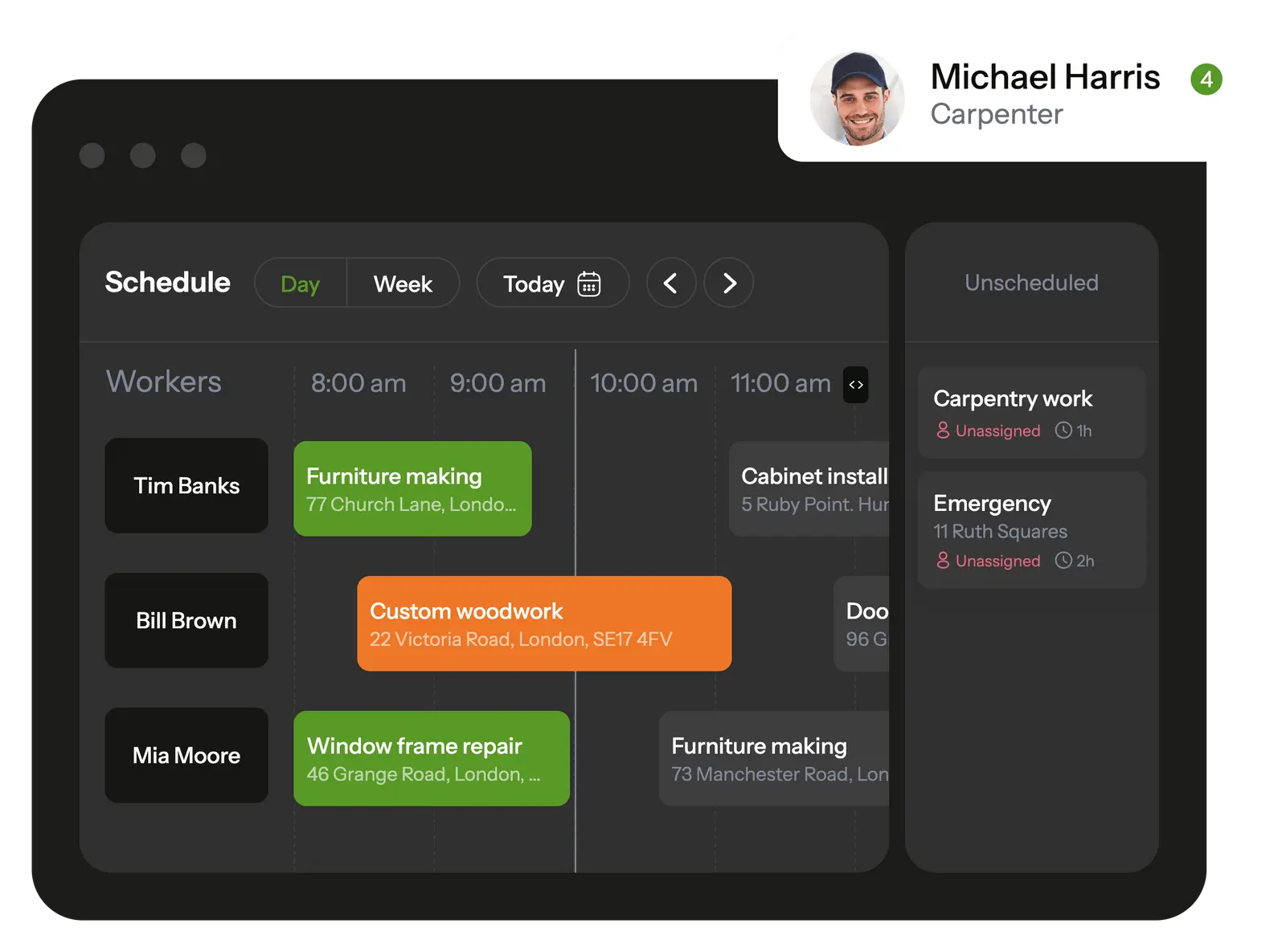
Planado simplifies task management and allows to control handyman service schedule in a few clicks
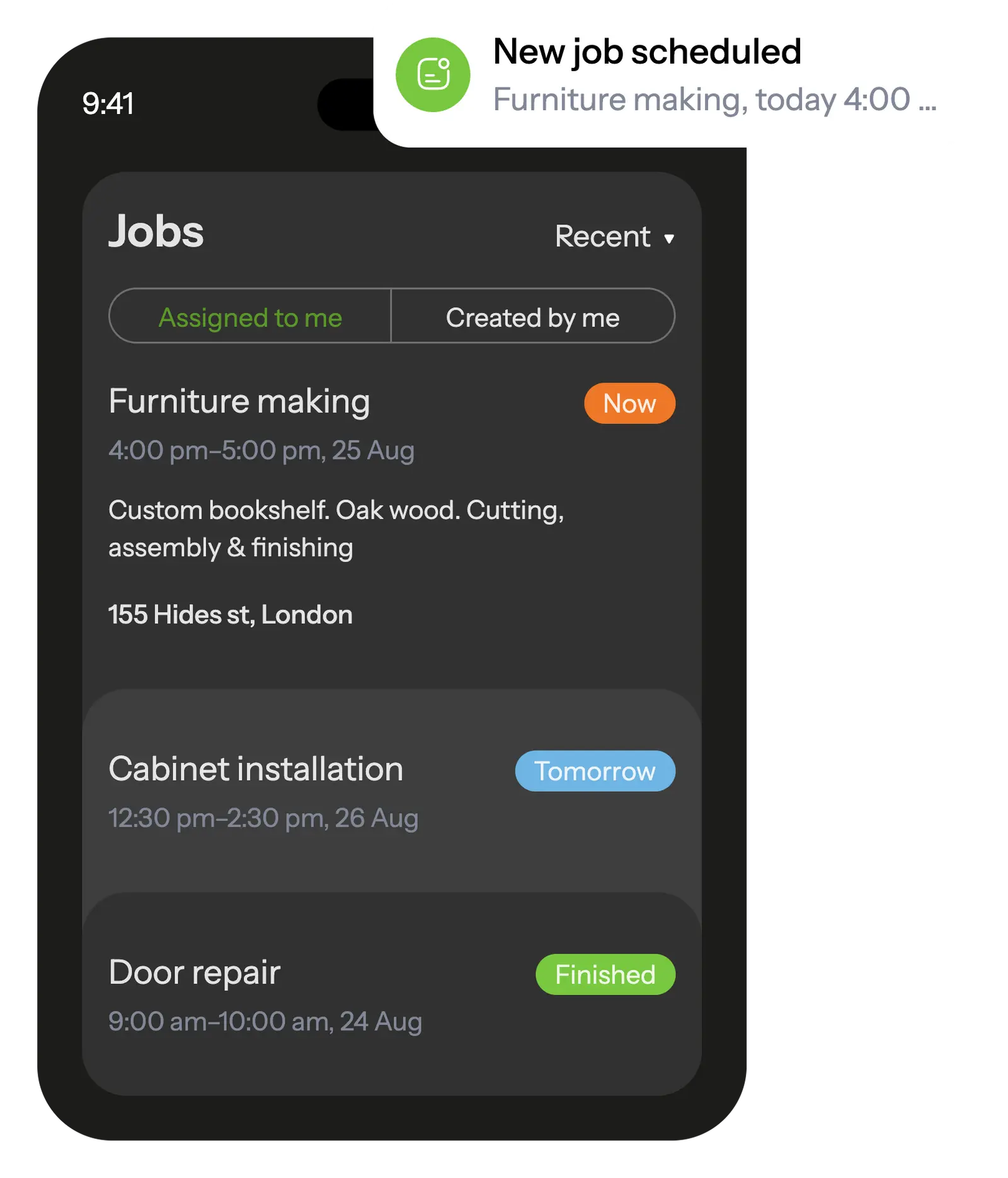
In the mobile app, your employees see all scheduled tasks and receive notifications about new assignments.
The built-in job checklists ensure that workers won't overlook any tasks on their to-do list.
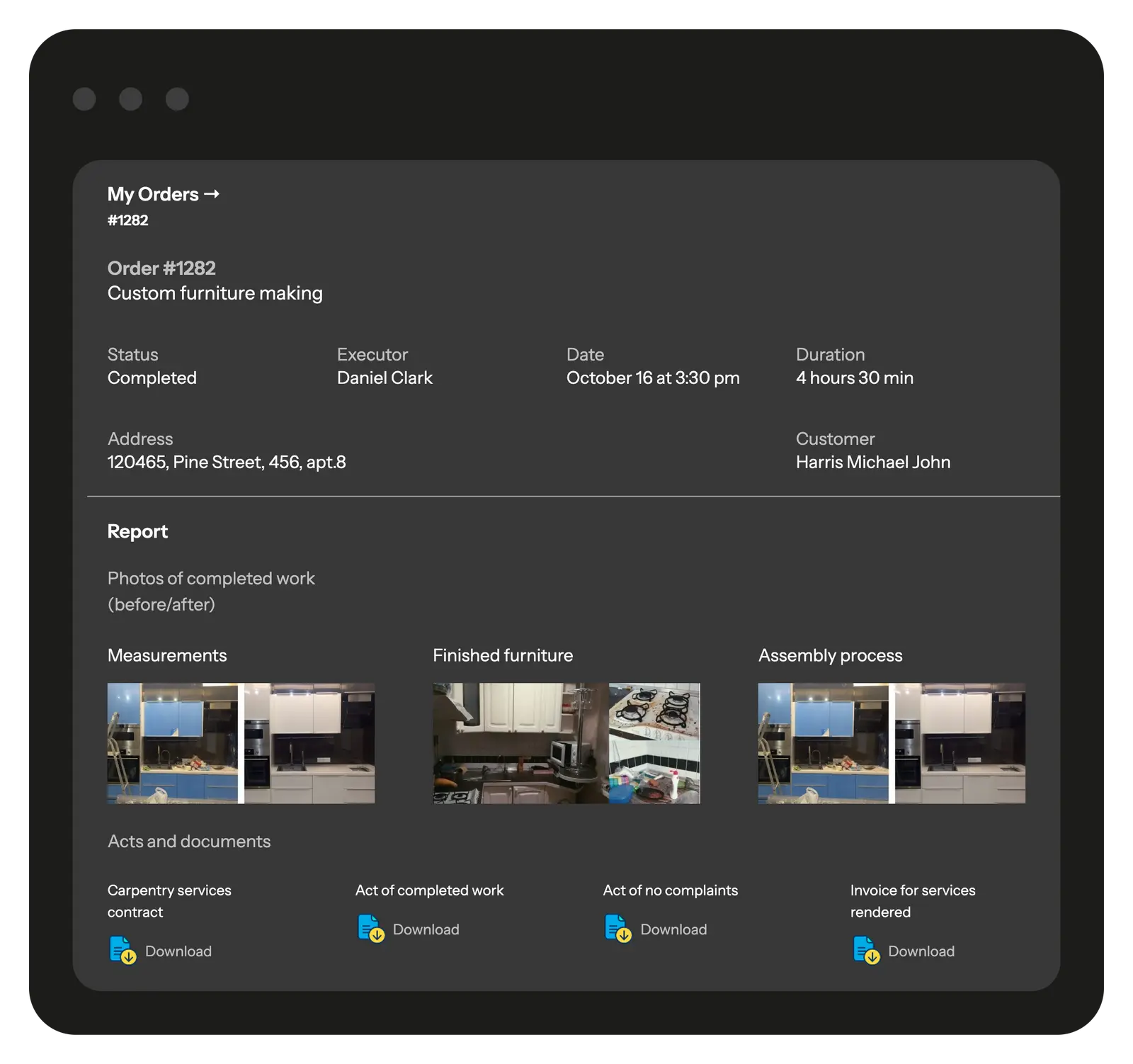
When a task is completed, the worker fills out a customizable report with photos and other fields that is automatically saved in the database and transmitted to the office.

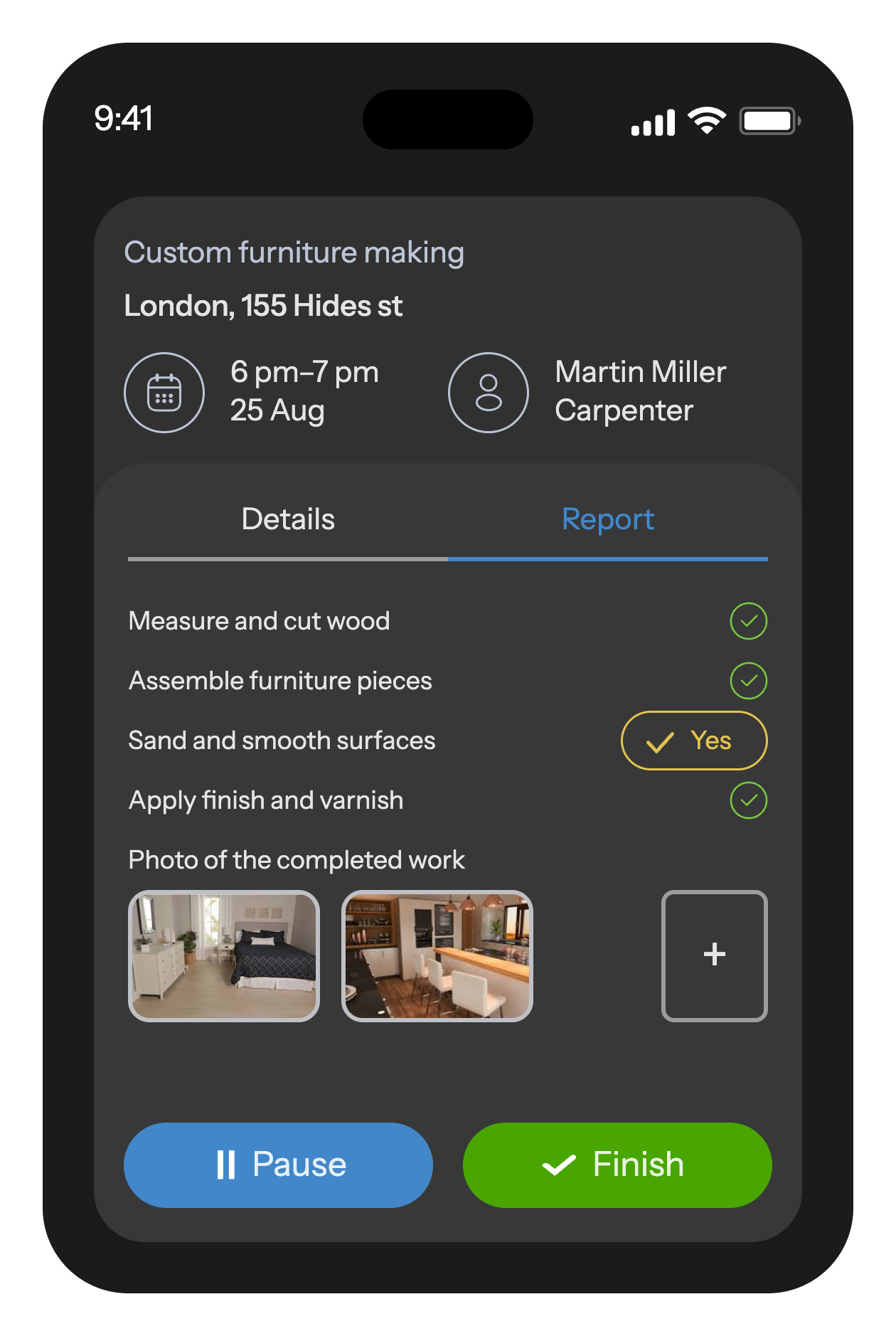
When worker starts the job, he will receive a checklist with the list of actions so he doesn't forget anything to do.
After completion, he will fill out a customizable report with photo, text and other various field types.
All reports with photos and other fields are saved in a database and can be useful, for example, in case of a warranty visit
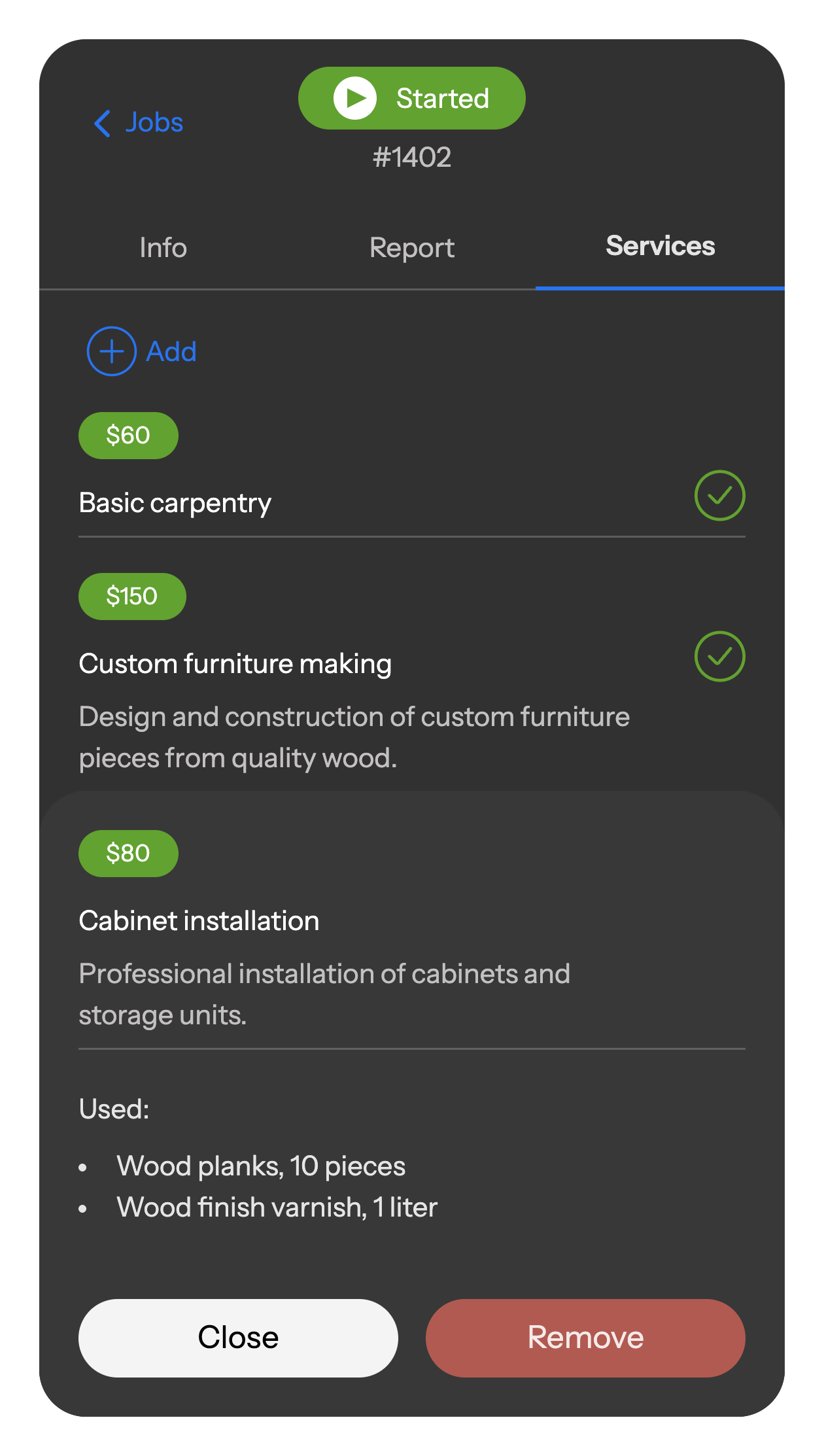
Workers record all used materials, consumables, and services directly in the mobile app. Everything is automatically logged, added to the report, and sent to the office — ensuring accurate records and full accountability.
Share a branded portal with clients, giving them full transparency into ongoing and completed projects, work stages, photo reports, and documents.
Through the portal, clients can track project status, view schedules, review reports, and leave feedback on service quality. You decide which projects and details are visible.
Dozens of carpentry companies around the world already use Planado to organize their business and increase profits.









Planado adapts to the workflows of carpentry teams of any size—from small shops to multi-crew installation services:
Configure workflows for measurements, fabrication, delivery, installation, finishing, and punch lists with mandatory steps and photos.
Set access for estimators, workshop staff, installers, and supervisors so everyone sees only what they need.
Connect with Salesforce, Zoho CRM, HubSpot, or your own systems via API for seamless task, photo, and analytics exchange.
Track workload, installation quality, rework causes, and time-to-completion across crews and projects.


 Tasks management SchedulingEmployee GPS tracking Employee's mobile appChecklists & reportsTeams & work shiftsCustomer notifications Create jobs in mobile appCRM integrationMileage trackingDocuments signing Recurring jobsProduct catalog and pick listAPI & Webhooks
Yes. In Planado you can create templates for framing, trim work, doors and hardware, cabinetry, punch lists, and site installations — each with its own schedule, checklist, and assigned team. This keeps both small service calls and multi-phase projects organized.
Field staff use the mobile app to:
Absolutely. Schedule reports with photos, comments, and task statuses. Export to Excel/PDF or share directly with stakeholders.
Yes. Planado supports bulk upload of staff and sites, easy task distribution across crews, and workload tracking for every employee. It scales from small teams to large multi-site operations.
Yes. Permissions are fully customizable by role, so each person sees only what they need.
Most teams get comfortable within 1–2 shifts. The app is designed for quick field use, and onboarding support is available for managers.
Yes. Use it for one-off installations and repairs, as well as recurring inspections, phased work, and ongoing punch-list execution.
Standardize workflows with digital checklists (measurements, hardware, finishing steps, punch-list items), require photo evidence, and run supervisor audits in the app. This reduces rework and improves handover results.
Yes. Teams can work offline; everything syncs automatically once connected.
Yes. Photo-based progress updates, structured punch-list tasks, and clear status tracking make approvals faster and reduce “what’s left to do?” back-and-forth.
Planado reduces admin overhead and rework by giving managers real-time visibility, standardizing execution with checklists, and keeping documentation in one place. That means fewer site revisits, fewer misunderstandings, and faster project closeout.
Carpentry Business Software for Invoicing and Takeoffs Some days a carpenter handles a quick fix, and the next day they’re deep into a custom build where one measurement can throw everything off. In moments like these, carpentry software acts more like a safety net than a formal system. It keeps takeoffs, notes, and small on-site changes in one place, so crews aren’t digging through old chats or trying to remember what was agreed on earlier. The workday feels steadier when the information isn’t scattered.
Teams that bounce between several jobs usually hit the same snag – something gets missed because no one had the full picture. With carpentry software, planning and material tracking stay visible to everyone involved. Installers open their phones and see what’s waiting for them instead of guessing or calling the office for clarification. A good setup gives structure to estimates, field work, and customer updates, which is why many businesses turn to carpenter business software as they grow. Even independent contractors benefit when their tools keep details straight – something carpenter contractor software handles well.
Planado ties these parts together by combining scheduling, takeoffs, reporting, and on-site photos into one routine that fits both fast repair calls and more complex woodworking projects.
Most teams use a mix of calls, photos, and quick notes to get through the day, but this system falls apart the moment several jobs overlap. Carpentry software keeps all of that loose information in one place – schedules, status updates, site photos, takeoff notes, and the back-and-forth that happens before work even starts. Instead of asking “who has the latest version?”, installers open the app and see the current task list without chasing details.
For companies handling both small fixes and larger builds, carpenter business software also helps keep project stages in order. Measurements, approvals, material lists, and comments stay attached to each job, so nothing depends on memory alone. When software for carpenters is paired with a tool like Planado, the office gains visibility, and field crews get clearer instructions without the usual friction.
Good carpenter business software focuses on the everyday things that normally slip through the cracks. Installers can check tasks, mark progress, and drop quick photos or notes straight from the site. Carpenter software keeps templates within reach, so repeat jobs take less time to set up, and crews always know what the next step looks like. Materials, stages, and timing details stay linked to the job instead of floating around in separate chats, which helps everyone keep the pacing right throughout the week.
When several installs, repairs, and custom builds land on the same week, it’s easy for crews to overlap or for a job ticket to disappear in the shuffle. That’s where carpentry scheduling software changes the pace: the day stops feeling like a chain of last-minute fixes, because every assignment lands in a clear schedule instead of drifting between calls and messages. Installers see where they’re needed, supervisors know who’s free, and deadlines stop slipping simply because the plan wasn’t visible.
For contractors juggling multiple sites, carpenter contractor software also helps prevent the usual “who’s doing what” confusion. Tasks update in real time, and notes or revisions show up before someone is already halfway across town. With Planado supporting this flow, coordination becomes steadier – crews stay aligned, the office spends less time correcting mistakes, and jobs move forward without the usual friction.
A lot of budget problems in carpentry start with one thing – a bad measurement. Miss the square footage on a built-in or underestimate materials for a stair rebuild, and the profit on the job narrows fast. That’s why carpentry takeoff software makes such a difference: it keeps measurements, notes, and photos in one place so estimators aren’t working from memory or scattered screenshots. Teams can compare takeoff details with real site conditions, spot mismatches earlier, and avoid ordering too much or too little material.
For contractors juggling several installs each week, it helps when the estimator and the installer aren’t working from two different stories. When carpenter contractor software passes along measurements, short notes, and a few on-site photos, the installer doesn’t have to guess what the quote was based on. They open the job, see the context, check the materials that were planned, and get moving without a round of calls back to the office. This alone prevents many of the small slips that tend to snowball on custom projects.
Planado keeps that chain intact by storing takeoff data, photos, and job history in one place. Estimates feel less like rough guesses and more like something you can rely on, and you avoid the extra costs that usually come from missing or mismatched details.
Good carpentry management software gives you one place to follow the moving parts of each job – the client’s history, the materials already used, and the steps still ahead. For carpenters who handle both quick repairs and multi-stage builds, this clarity matters: what starts as rough framing can turn into detailed finish work days later, and the team needs a clear record to avoid repeating measurements or ordering materials twice. With software for carpenters, the notes, photos, and material logs stay tied to the same job, so the next technician knows exactly where things stood. Planado supports this flow by keeping updates easy to record and even easier to check before heading onsite.
When the job wraps up, the paperwork shouldn’t take longer than the final touches. Carpenter invoicing software helps crews create estimates or final charges on the spot, without digging through old messages or handwritten notes. A built-in CRM keeps conversations, approvals, and changes in one thread, which cuts down on misunderstandings later. Tools like this – similar to what flooring CRM systems offer – help reduce disputes and keep operations cleaner and quicker for everyone involved.
When much of the work happens on the move, software for carpenters has to fit naturally into the day – not slow it down. Mobile access lets installers open their task list the moment they reach the site, check measurements or notes from earlier visits, and add new photos without switching between apps. The updates flow back to the office in seconds, which means the supervisor sees progress as it happens instead of waiting for end-of-day messages. With carpenter software in place, small details stop slipping through the cracks, and crews spend less time coordinating and more time building.
Modern carpentry software keeps everyone on the same page by recording job progress the moment a task is finished. Techs snap photos, add short comments, and mark steps as complete, which reduces the stream of check-in calls and keeps the office informed without extra effort. This helps carpenter business software act as a running log of the day instead of a pile of scattered notes. Planado keeps these updates light and fast, making it easy for teams to move from one stage to the next without losing context. Get Started With Planado Carpentry Management Software
Planado also gives managers a clearer view of what’s happening across projects. Schedules update quickly, materials and notes stay attached to the job, and field reports arrive without delays. When the workflow feels more predictable, teams lose fewer hours to rework and start delivering steadier results day after day.
If you’re ready to simplify coordination and give your projects a more organized rhythm, Planado makes the shift easy. Start your free trial to see how the system adapts to your carpentry process – and let our team configure it for you so you can begin working with a fully prepared setup from day one.
A solid carpenter business software should help you keep tasks, photos, measurements, and approvals in one place. When jobs stay organized this way, crews waste less time searching for details or calling the office back and forth. If you’re comparing tools, test how easily they handle day-to-day updates.
Carpentry scheduling software keeps everyone aligned on who goes where and when. Installers see changes the moment they’re made, which reduces mix-ups and late arrivals. A quick trial will show you how much smoother the workload feels with a clearer schedule.
Carpentry takeoff software helps you measure, record notes, and plan materials with fewer mistakes. Since everything ties back to the project in one place, estimates feel less like guesswork. If takeoffs often slow your team down, this type of tool is worth testing.
Yes, carpenter invoicing software shortens the time between finishing a job and getting paid. You can send estimates or invoices directly from the field and keep the conversation with the client documented. A quick demo makes it clear how much admin effort this removes.
Software for carpenters keeps each stage visible – prep, fabrication, installation, and final checks. Because photos and notes stay attached to the job, handoffs between team members become easier. This helps projects move with fewer surprises.
Many carpentry software programs can connect with tools you already use for accounting or customer communication. This keeps numbers, messages, and job details consistent instead of scattered. If integrations matter for your workflow, try syncing a test job to see how it behaves.
Yes, it helps small operators stay organized and gives bigger teams the structure needed to coordinate multiple jobs at once. The same tools support clearer schedules, cleaner documentation, and faster decisions. If your workload is growing, this type of software can make the jump easier.