
How Does 24/7 Field Service Management Handle Emergency Requests?

How Does 24/7 Field Service Management Handle Emergency Requests and On-Call Technician Scheduling?
After-hours emergency demand doesn't fit daytime scheduling logic. Job volume is unpredictable, response windows are measured in minutes rather than hours, and the cost of a missed call – equipment downtime, SLA breach, client escalation – arrives before the next business day. On-call scheduling and emergency dispatch require a separate coordination layer: defined coverage roles, structured intake, and real-time technician visibility that operates independently of the regular dispatch calendar. Without that layer, on-call scheduling defaults to informal call chains – and informal call chains fail exactly when the situation is most time-sensitive.
Why 24/7 Field Service Needs a Different Operating Model
Daytime scheduling assumes predictable demand. Jobs are booked in advance, routes are planned by proximity, and technicians move through a sequence that was built hours earlier. 24/7 service management operates under none of those conditions. Emergency requests arrive without notice, often cluster around the same time, and require immediate routing decisions without the buffer that planned scheduling provides.
The gap isn't about staffing levels. A fully staffed daytime team running on daytime logic still fails after-hours emergencies – because the system wasn't designed to handle unscheduled demand. Triage doesn't happen automatically, on-call coverage isn't visible in the dispatch interface, and rescheduling existing jobs to absorb an urgent insertion requires manual intervention at 2am. SLA penalties and equipment downtime compound that failure fast. A missed four-hour response window on a critical HVAC system or electrical fault costs more than the job itself. That's a system design problem, and it requires a system-level response.
Emergency Request Handling After Hours
Emergency job handling breaks down when intake relies on voicemail queues or manual call chains. By the time a message reaches a dispatcher, gets escalated, and results in an assignment, the response window has already compressed. Structured intake replaces that sequence with defined system behaviors that trigger automatically when an urgent request comes in.
The core behaviors in an emergency request workflow follow a fixed order:
- Triage – the request is categorized by urgency and job type before any assignment decision is made;
- Prioritization – the job is ranked against existing workload to determine insertion point;
- Acknowledgement – the client receives confirmation that the request is active, not pending;
- Routing – the system identifies qualified available technicians and surfaces dispatch options. Without that structure, the fastest available technician gets the job regardless of skill match. An HVAC emergency routed to an electrician because they were closest produces a failed first visit – and a second dispatch that doubles response time.
How On-Call Scheduling Supports Continuous Coverage

On call scheduling functions as a rotating coverage model – not a calendar note that says "John is on call this week." Effective after hours scheduling defines which technician is responsible for which job types during which hours, what the fallback sequence is if the primary responder is unavailable, and where that information lives so dispatchers can act on it without making three phone calls first.
When on-call rotation is visible inside the dispatch system, the first responder is identified in seconds. A dispatcher handling a 3am emergency doesn't search a shared spreadsheet or scroll through contacts – the system shows who is on call, where they are, and whether they're already on a job. That visibility is what separates a coverage model from a coverage assumption.
Planado's shift and availability management lets managers define working hours, on-call windows, and days off per technician. Assignments don't land outside those boundaries – which means the dispatch system reflects actual coverage, not theoretical availability.
Skills, Location, and Real-Time Dispatch in Emergency Response
Emergency dispatch accuracy depends on matching skill and proximity at the same time – not sequentially. A technician who is nearby but uncertified for the job type produces a failed first visit. One who is certified but 60 miles out adds response time that may breach the service window. Field service emergency response requires both conditions to be valid before an assignment is confirmed.
Real-time location data changes the quality of that decision significantly. In Planado, dispatchers see all active technician positions on the map and can filter by job type – the nearest qualified technician is visible in a single view, without cross-referencing a separate skills database or calling around to check availability.
Workload matters too. A technician who is nearby and qualified but already running late on a complex job is not a realistic assignment for an urgent call. Dispatch logic that surfaces current job status alongside location and skill data produces assignments that actually hold – rather than creating a second emergency when the first one runs over.
Buffer Capacity, Rescheduling, and 24/7 Operational Stability
Fully saturated schedules have no room for emergency insertion. When every technician runs at 100% capacity through the day, an urgent job doesn't just add work – it breaks the existing sequence. Something has to move, and in the absence of automatic rescheduling logic, that movement happens manually, under pressure, at whatever hour the emergency arrives.
Buffer capacity is a structural requirement, not scheduling slack. Operations running 24/7 build controlled gaps into technician routes specifically to absorb urgent insertions without collapsing adjacent jobs. When an emergency gets added to a live schedule, the cascade is predictable:
The affected routine job gets flagged as delayed;
- Adjacent time slots recalculate based on the new sequence;
- The technician receives an updated route on their mobile app;
- The dispatcher sees the revised schedule on the calendar in real time. In Planado, that update reaches the technician's mobile app instantly – no phone call, no manual reassignment. Overdue and Prolonged job flags alert dispatchers to schedule stress before it compounds, giving them time to intervene before a delay becomes a missed appointment.
How Planado Supports 24/7 Emergency and On-Call Operations
Planado connects the coordination layers that 24/7 operations depend on – on-call rotation visibility, emergency job creation, real-time GPS dispatch, and automatic rescheduling – into a single workflow. When an urgent request comes in, a dispatcher creates the job, sees qualified on-call technicians on the map, and pushes the assignment to the technician's mobile app without a call chain.
Technician positions update on every status change and at regular background intervals, so the dispatch view reflects where people actually are – not where they were scheduled to be an hour ago.
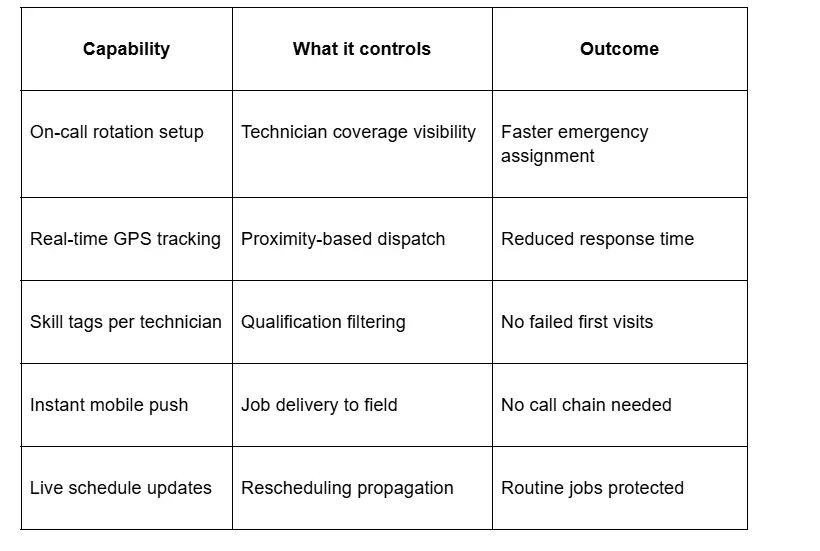
Shift boundaries in Planado prevent assignments from landing outside defined working or on-call hours – so the coverage the system shows is coverage that actually exists. Planado connects on-call scheduling, emergency dispatch, and real-time technician visibility into one workflow. If your team handles after-hours field operations, it's worth seeing how the system manages urgent jobs in practice.
Conclusion
24/7 service management handles emergency requests reliably when triage, on-call coverage, and dispatch logic operate as a connected system – not as separate manual processes that someone coordinates under pressure at odd hours. Structured intake determines priority. Visible on-call rotation identifies the right technician. Real-time dispatch gets the assignment there without a call chain. Automatic rescheduling protects the rest of the day's work.
The difference between operations that absorb emergencies and ones that get disrupted by them comes down to coordination logic and data visibility – not headcount or goodwill.
If continuous field operations and emergency response are part of your service model, Planado is worth a closer look – the platform connects on-call scheduling, dispatch logic, and rescheduling in a single workflow.
FAQs
What is the difference between emergency dispatch and normal field service scheduling?
Normal scheduling builds routes in advance based on planned demand. Emergency dispatch operates on live data – current technician location, availability, and skill match – to assign urgent jobs within a compressed response window, often outside business hours.
How does on call scheduling reduce delays in after-hours response?
On call scheduling makes coverage visible inside the dispatch system, so the responsible technician is identified immediately rather than located through a manual call chain. After hours scheduling that defines roles, fallback sequences, and time windows eliminates the handover gaps that delay emergency response.
Why is fallback logic important in 24/7 emergency operations?
The primary on-call technician may already be on a job when a second emergency arrives. Fallback logic defines who gets the next assignment automatically, without requiring a dispatcher to restart the search from scratch under time pressure.
How do field service teams balance routine jobs with urgent requests?
Buffer capacity built into technician schedules creates room for emergency insertion without collapsing adjacent jobs. When an urgent job is added, the system recalculates the affected route and flags delayed tasks – protecting routine work rather than simply overwriting it.
What data is most important for accurate emergency technician assignment?
Real-time location, current job status, and verified skill tags are the three data points that determine assignment accuracy under emergency conditions. Without all three, dispatch defaults to proximity alone – which produces fast assignments that frequently fail on arrival.
